
@agenticecom.net/form-builder
AgenticEcom Form Builder
Build accessible enquiry forms with preview, private submissions and delivery receipts.
About AgenticEcom Form Builder
Build enquiry forms in EmDash and give visitors a clear, accessible way to contact your team.
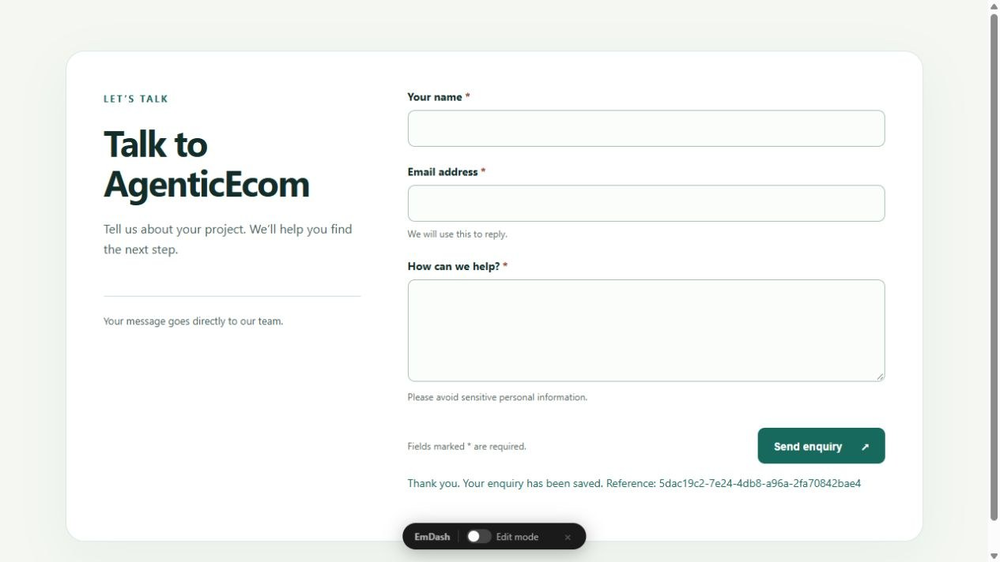
- Contact template or blank form; add, edit, reorder and remove fields.
- Text, email, textarea, select and checkbox fields with server validation.
- Draft editing with a separate published visitor version.
- Supplied Astro renderer with responsive styling, field help and keyboard focus.
- Private administrator inbox, review notes, archive/restore and paginated CSV preview.
- Saved enquiries and separate notification receipts, with bounded manual retries.
- Signed tickets, duplicate retry protection and a basic honeypot.
Free MIT release. Up to twenty fields per form. Email needs an EmDash mail provider. Install the included native Astro companion once for visitor pages or template embeds. No uploads, conditional logic, multi-step forms, CAPTCHA or CRM connector in this release. Local EmDash 1.1 / Node / Workerd tested; Cloudflare CPU limits unverified.
Screenshots
Security
Report security issues privately through https://agenticecom.net/contact-us. Do not include credentials or private submissions in public reports.
Changelog
0.1.0: Initial free release. Local EmDash 1.1 / Node / Workerd tested. Cloudflare CPU limits unverified.
Installation
Install AgenticEcom Form Builder from the registry. Its only capability is sending notifications through your site's configured mail provider; the inbox works without email.
Copy the complete MIT Astro companion from the bundled README and add enquiries({ pluginId: 'YOUR_INSTALLED_PLUGIN_ID' }) to your Astro integrations. The installed ID appears after /plugins/ in the plugin's admin page URL and normally starts r_ for registry installs. Restart/build once. Published forms then appear at /enquiries/FORM_ID; copy the form ID shown in the builder. You can also import the supplied Form.astro into your own Astro pages.
Create a form, review its fields and publish the draft. Submit a test enquiry and review the private inbox. Configure email separately if you want notifications. The supplied standalone page is noindex. Basic spam controls do not stop determined automated abuse; add suitable site perimeter protection. Back up site data and configuration before upgrading.