@agenticecom.net/llms-txt
LLMs.txt Publisher
Curate published content into an llms.txt guide and public Markdown pages.
About LLMs.txt Publisher
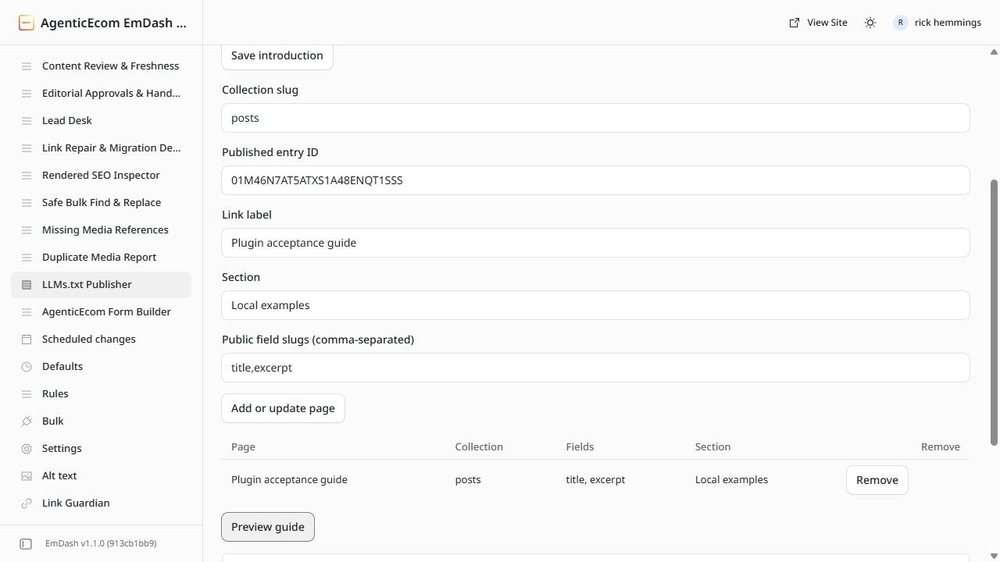
Give agents a concise guide to your published EmDash content. Choose the pages, sections and public fields explicitly, preview the result, and serve /llms.txt plus clean Markdown pages through the supplied Astro companion.
- Curated guide with a site introduction and grouped links.
- Exports the live revision, keeping newer drafts private.
- Excludes unpublished and noindex entries.
- Supports selected string, text and standard Portable Text blocks.
- Read-only content permissions; no AI account or outbound network permission.
Free MIT release. Supports up to twenty curated pages and five fields per page. The registry plugin does not inject site routes: install the included native companion once. Local EmDash 1.1 / Node / Workerd tested; Cloudflare CPU limits unverified. llms.txt is a proposal, with no promised search ranking or AI visibility improvement.
Screenshots
Security
Report security issues privately through https://agenticecom.net/contact-us. Do not include credentials or private submissions in public reports.
Changelog
0.1.0: Initial free release. Local EmDash 1.1 / Node / Workerd tested. Cloudflare CPU limits unverified.
Installation
Install LLMs.txt Publisher from the registry and review its content, revision and schema read permissions. Open its admin page and add only fields suitable for public access.
To serve /llms.txt and Markdown pages, copy the complete MIT Astro companion from the bundled README. Add discovery({ pluginId: 'YOUR_INSTALLED_PLUGIN_ID' }) to your site's Astro integrations. Get the installed ID from the admin page URL: the part after /plugins/. Registry installations normally use an r_... ID. Restart/build the site once.
Use a routable collection with published content. Enter its collection slug, entry ID, public label, section and export field slugs. Preview, then open /llms.txt and follow its links. The public routes never provide draft revisions. Back up site data and configuration before upgrading.