
Page SEO Inspector
Check the SEO details your pages actually output: titles, descriptions, headings and social tags. Spot missing or inconsistent metadata.
@agenticecom.net/rendered-seo-inspectorOr open Registry in your EmDash admin and search for this name.
Overview
Page SEO Inspector
Check what your pages actually output for search engines and social sharing. Inspect a public page’s HTML for its title, description, canonical URL, robots settings, main heading and social tags, then keep a report of what you found.
What you can do
- Inspect a public HTTPS page or paste HTML for review.
- Check metadata and headings in the page output, not just editor settings.
- Optionally compare the report with an entry’s configured SEO.
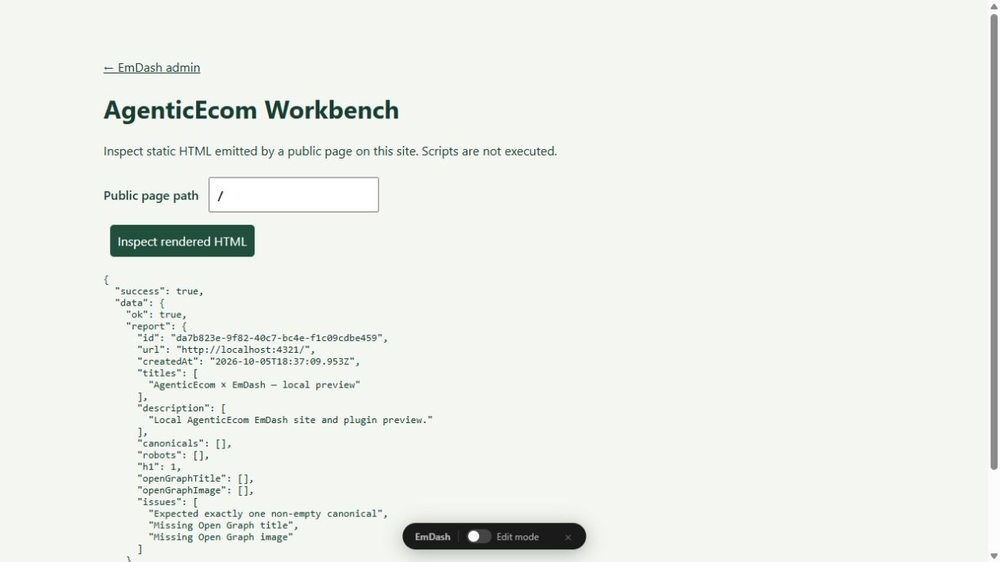
- Use the Astro Workbench companion to inspect public pages on a local test site.
Use
In the current release, open “Rendered SEO Inspector” and enter a public HTTPS URL or paste HTML. Use the companion to inspect a public page path on the local site.
Limits
Scripts are not executed; this is a bounded static parser, not a browser crawler or ranking tool. HTML is limited to 512,000 characters. Same-site localhost inspection needs the optional Astro companion. No private-address fetching.
Licence: MIT. Publisher: AgenticEcom (agenticecom.net).
Screenshots
Permissions
Plugins get only the capabilities they declare and you approve. Your EmDash admin lists these again before anything installs.
Security
Report security issues through https://agenticecom.net/contact-us. Do not include credentials or private content in public reports.
Changelog
0.1.1: Corrected product-specific icon; runtime and requested permissions unchanged.
0.1.0: Initial AgenticEcom workbench release. Local EmDash 1.1/Workerd verification; see README for scope and limits.
Installation
Install the verified registry release from EmDash Plugins. Review the requested capabilities before activation. Read the README companion requirements before installing.
Keep exploring
More plugins like Page SEO Inspector
Browse by keyword, or see everything @agenticecom.net publishes.