@peachfinthemes.com/auto-unpublish-posts
Auto Unpublish Posts
Unpublish, trash or retag any EmDash post on a date. Collection defaults, email alerts and a run log; Pro adds rules and bulk.
About Auto Unpublish Posts
Schedule a future change to any entry in any collection: unpublish it, move it to the trash, or change its terms. WordPress users know this as post expiration.
Free
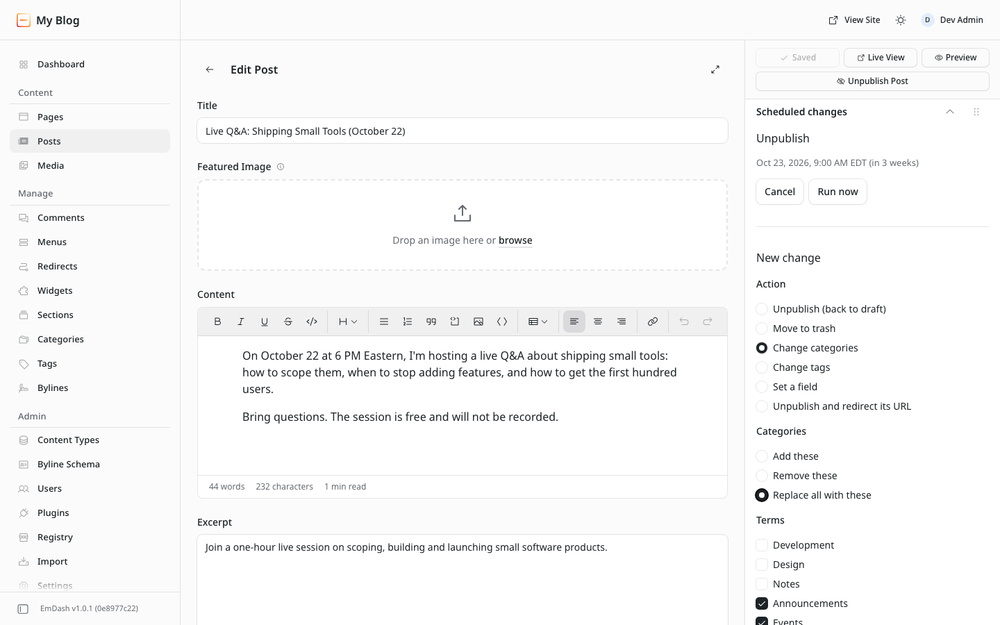
- Editor sidebar panel on every collection: schedule, see, cancel or run changes; latest runs.
- Actions: unpublish (a pending scheduled publication is canceled first), move to trash, and add, remove or replace terms.
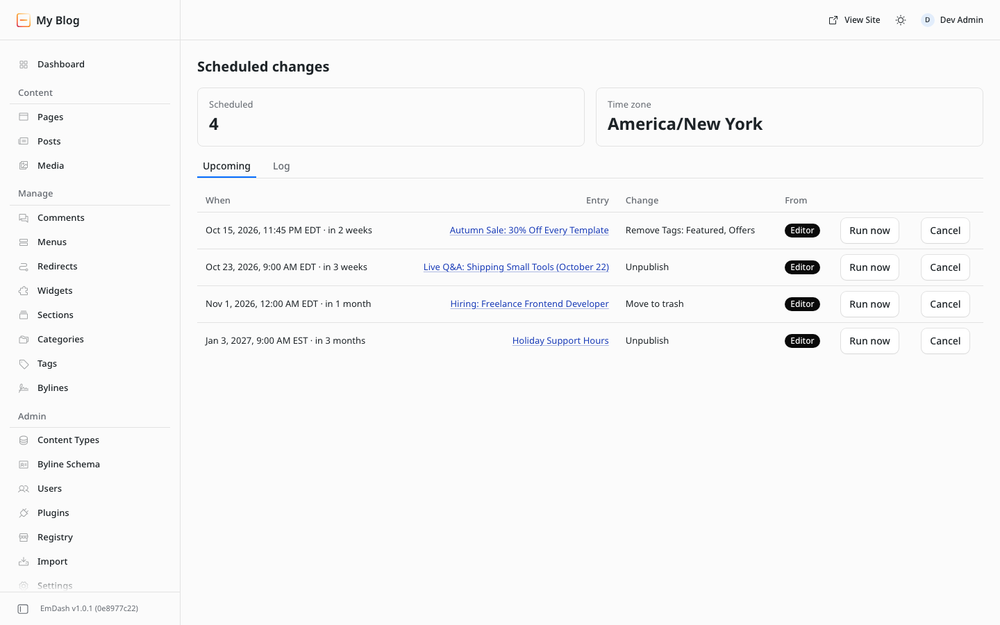
- Scheduled changes page with upcoming changes and the last 50 runs.
- Collection defaults, such as unpublish 30 days after first publishing.
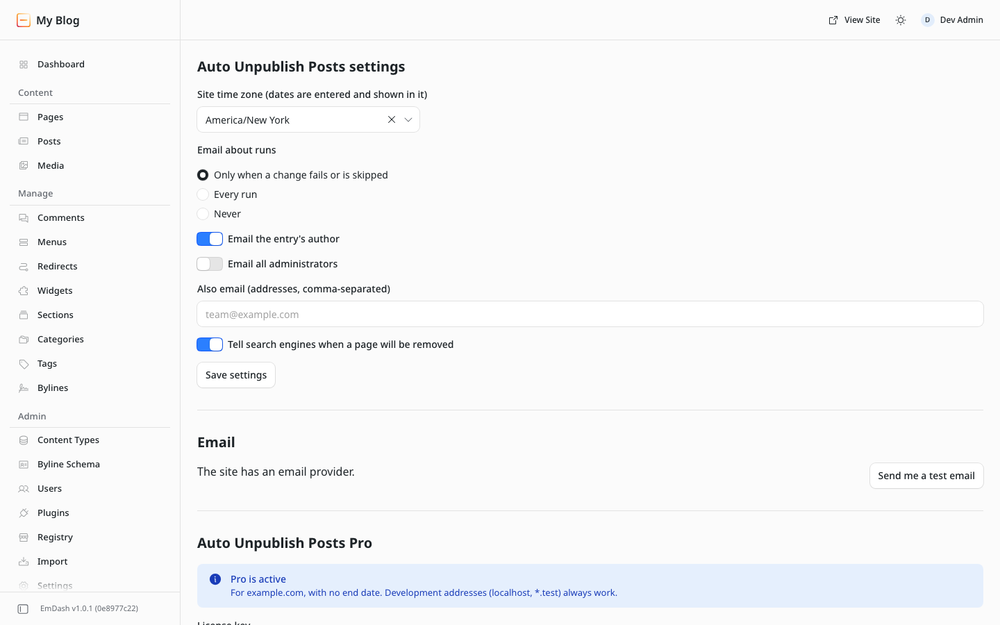
- Email notifications through the site's email provider, to the author, administrators or other addresses.
- Search engines get
robots: unavailable_afteron pages due to be removed. - Dashboard widget and a site time zone setting.
- AI agent tools over MCP: list, schedule and cancel changes, set collection defaults.
Pro
Same package, unlocked by a yearly license key pasted in Settings. The key is checked offline and bound to your domains.
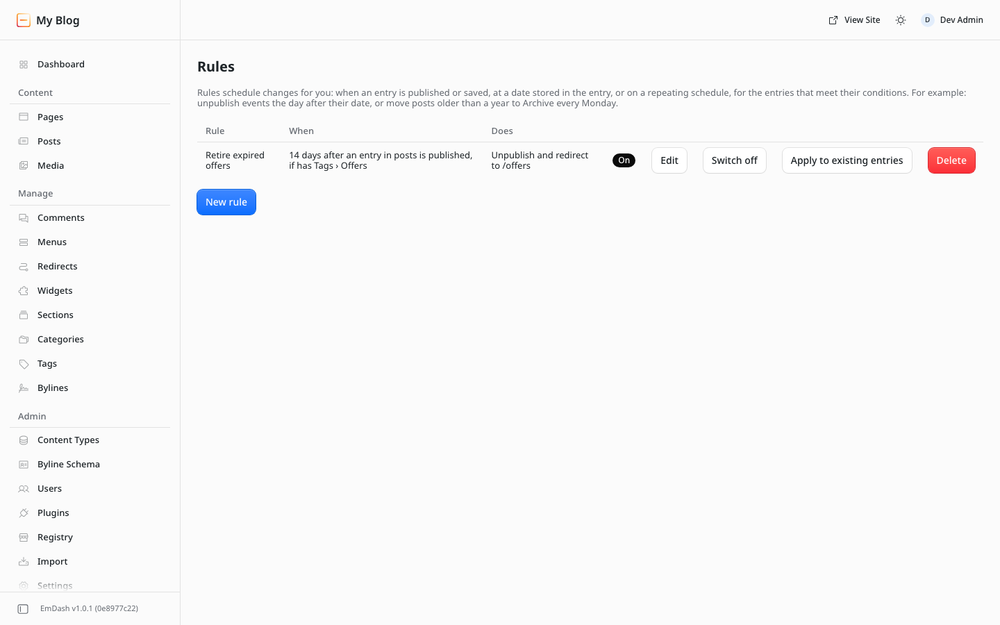
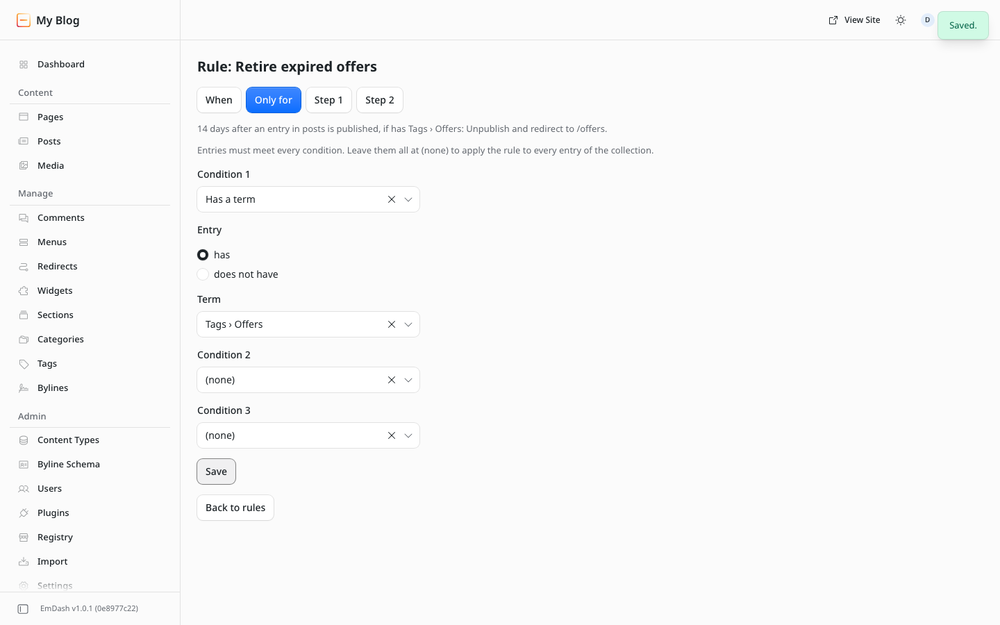
- Rules: on publish, on save, at a date stored in the entry, or daily, weekly or monthly. Up to 3 conditions (term, status, field value, age, author) and up to 3 steps, each with an optional condition and "otherwise" for if/else.
- More actions: set a field, unpublish and redirect (301, 302 or 410), and send an email from a rule.
- Bulk scheduling of up to 2,000 entries by collection, status, term and age.
- CSV import (300 rows) and export of the log and schedule.
- Full log with paging and an outcome filter.
- More agent tools: batches of 100 changes, the run log, rules.
An expired license never stops existing automations; it only locks creating and editing Pro features. Buy Pro at https://peachfinthemes.com/auto-unpublish-posts/.
Reliability
Each change is claimed before it runs, so it runs once. Every run, skip and failure is logged with a reason. Temporary failures are retried after 5 and 10 minutes.
Screenshots
Faq
Does the plugin make network requests?
No. It declares no allowed hosts and checks the license key offline. Emails go through your site's EmDash email provider.
When exactly does a change run?
Each change is an EmDash scheduled task due at the time you set. An hourly sweep re-arms any overdue change whose task was lost.
What if a change fails?
A temporary failure is retried after 5 and 10 minutes. After the third failed attempt it is marked failed, logged with the reason, and emailed if notifications are on. Errors a retry cannot fix fail at once. If the entry was deleted first, the change is skipped and the log says why.
Who can schedule and cancel?
Authors: their own entries and the changes they scheduled. Editors: any entry, and bulk scheduling. Administrators also manage settings, defaults, rules, the license and redirects. The server checks this on every request.
Does "set a field" publish other unpublished edits?
No. If the entry has other unpublished edits, the new value waits in the draft and the log says so.
Will a scheduled redirect replace one I made?
No. The plugin changes only redirects it created. If another redirect exists for the address, the change fails.
Where do I buy Pro?
On the Peachfin Themes store: https://peachfinthemes.com/auto-unpublish-posts/. Yearly licenses: 1 site $49, 5 sites $99, unlimited sites $149. After checkout, enter your domains on the order page or under My account → EmDash licenses to get your key.
What happens when a license expires?
Existing rules, defaults and scheduled changes keep running; only creating and editing Pro features locks. Renew under My account → EmDash licenses: the same license gets another year and a new key.
How long is history kept?
The log keeps 180 days. Finished changes are removed after 90 days.
Can a rule trigger itself?
No. The plugin's own publishes never trigger its rules or defaults.
Security
Reporting a problem
Report security issues privately to hello@peachfinthemes.com. Please do not open a public issue first.
Permissions
- Content write and publish: unpublish, move to trash, set a field, and cancel a pending scheduled publication.
- Taxonomies write: add, remove and replace terms.
- Redirects write: the Pro unpublish-and-redirect action. It changes only redirects the plugin created.
- Send email: run notifications, the test email and email steps.
- Read users: find the author's and administrators' email addresses, and match the author condition in rules.
- Read schema: list collections and fields for the forms.
The plugin declares no allowed hosts, so it cannot make network requests.
Access control
The admin pages, the editor panel and the agent tools check the caller's EmDash role on the server. Authors act only on their own entries. Editors act on any entry. Only administrators change settings, defaults, rules, the license and redirects. Agent tools cannot send email.
Public route
One route is public: export, the CSV download. A followed download link cannot carry EmDash's admin request header, so each link is signed with HMAC-SHA-256 using a random key kept in the plugin's configuration. A link expires after 10 minutes. Downloads also need an active Pro license.
Data stored
The plugin stores its data in its own storage on your site: scheduled changes, the run log, settings, defaults, rules and the license key. Records include entry IDs and titles, and the ID and name of the person who scheduled a change. The log is kept for 180 days and finished changes for 90 days. Nothing is sent anywhere except the emails you configure.
License keys
Keys are issued by the Peachfin Themes store, Ed25519-signed and verified offline. The plugin never contacts the store. A key contains an order ID, its domains and its expiry date. No personal data is in it.
Changelog
1.0.0 — first release
Free:
- Editor sidebar panel on every collection: schedule, see, cancel and run changes; latest runs.
- Actions: unpublish (cancels a pending scheduled publication first), move to trash, add, remove or replace terms.
- Scheduled changes page with upcoming changes and the last 50 runs.
- Collection defaults, such as unpublish 30 days after publishing.
- Email notifications through the site's email provider, with a test email button.
robotsunavailable_aftertag for pages with a scheduled unpublish or trash.- Dashboard widget.
- Site time zone setting. Dates are stored in UTC and handle daylight saving time.
- AI agent tools:
list_scheduled_changes,schedule_change,cancel_scheduled_change,set_collection_default.
Pro (yearly license key, checked offline):
- Rules with triggers, up to 3 conditions and up to 3 conditional steps.
- Set a field, unpublish and redirect, and email steps.
- Bulk scheduling of up to 2,000 entries.
- CSV import (300 rows) and CSV export of the log and the schedule.
- Full log with paging and an outcome filter.
- Agent tools:
schedule_changes,get_run_log,list_rules,update_rule. - Settings, Rules, Bulk and the editor panel link to the Pro page on sites without Pro.
Installation
Requirements
- EmDash 1.0 or later with a plugin sandbox runner. On Cloudflare that needs the Workers Paid plan and a Worker Loader binding.
- An email provider in EmDash, if you want run notifications or email steps. Changes run without one.
Install
- Select Open in EmDash on this page and enter your site's address, or find Auto Unpublish Posts in the plugin registry inside your EmDash admin.
- Review the requested permissions and confirm.
First steps
- Open the plugin's Settings page (administrators). Set the site time zone, choose who gets run emails, and send yourself a test email.
- Open any saved entry. In the sidebar, the Scheduled changes panel lets you pick an action, a date and a time. Confirm to schedule.
- Optional: on Defaults, schedule a change automatically when entries of a collection are published.
- Watch upcoming changes and the run log on Scheduled changes.
Pro
- Buy a license at https://peachfinthemes.com/auto-unpublish-posts/. The Get Pro link on the plugin's Settings page goes there too.
- After checkout, enter your site's domain on the order page or under My account → EmDash licenses to get your key.
- Paste the key under Settings → Auto Unpublish Posts Pro and save.
A key works on the domains it was issued for and their subdomains. localhost, *.localhost and *.test always work, for development.
AI agents
The tools are served by EmDash's own MCP server at /_emdash/api/mcp. Scripts can call the same routes with an EmDash API token that has the admin scope, for example POST /_emdash/api/plugins/auto-unpublish-posts/mcp-list. Each tool checks the token user's role, like the admin does.