
@peachfinthemes.com/comment-spam-protection
Comment Spam Protection
Stop comment spam in EmDash with local rules: blocked words, links, language, duplicates and rate limits, with a log of why.
About Comment Spam Protection
Comment Spam Protection checks every new comment on your EmDash site against rules you set, and shows you why each comment was approved, held for review or marked as spam.
Everything runs on your own site. No outside service, no account, no API key.
Free
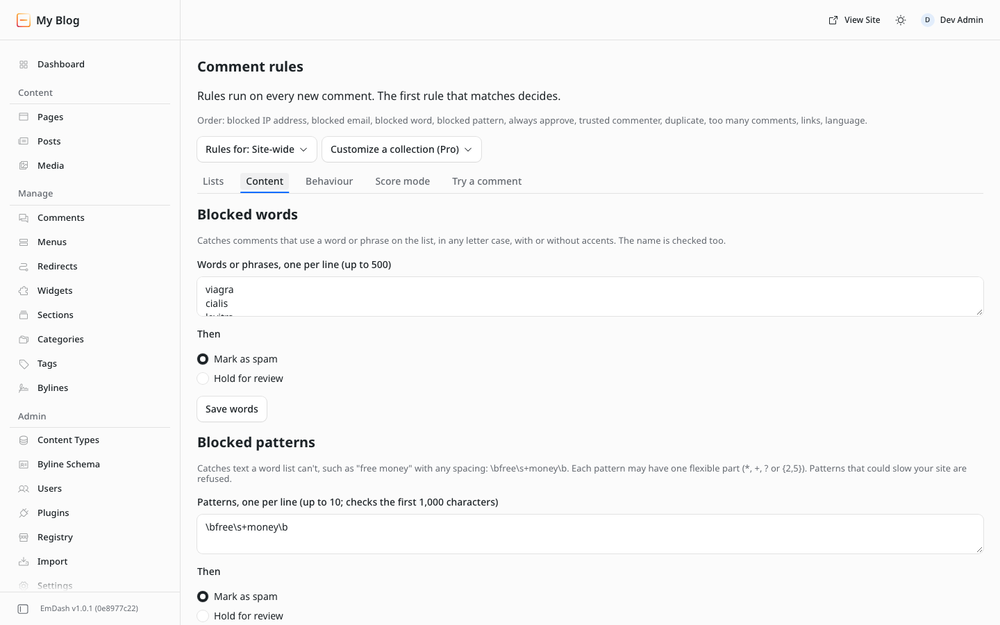
- Blocked words and phrases, in any letter case, with or without accents.
- Blocked patterns for text a word list can't catch, such as "free money" with any spacing.
- Link limit: hold comments with too many links.
- Language check: hold comments written mostly in an alphabet your site does not use.
- Duplicates and too many comments from one person.
- Blocked and always-approved emails and domains.
- Blocked IP addresses, added from a comment with one click.
- Trusted commenters: signed-in members, or people with approved comments.
- For each rule, choose what happens: spam, hold for review, or approve.
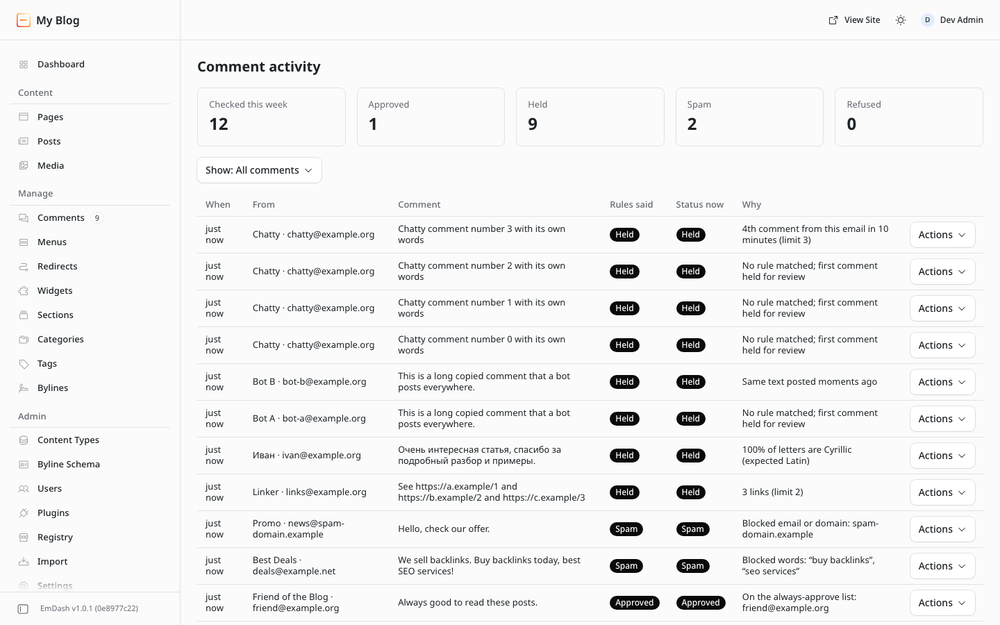
- Comment activity: every decision with its reason, filters and a dashboard widget.
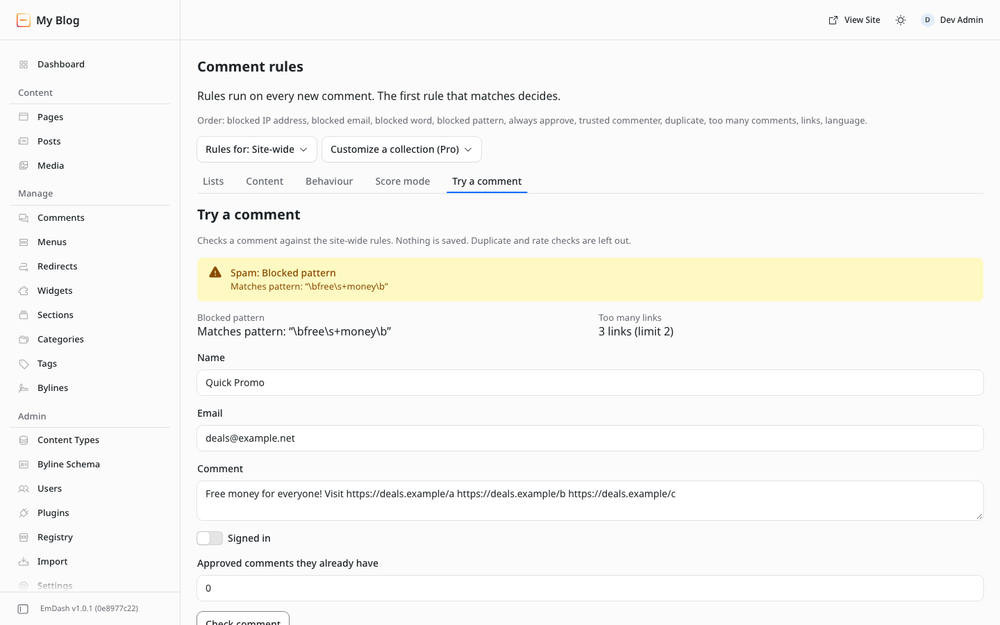
- Try a comment: test your rules before visitors do.
- Refuse clear spam outright, if you prefer.
It works out of the box: common spam phrases, a two-link limit, a language check based on your site's language, duplicate and rate limits, and your own EmDash comment setting for everything else.
Already use another moderation plugin? Comment Spam Protection adds its result and reasons to each comment for that plugin, records them, and can move spam afterwards.
Pro
- Score mode: matching rules add points; you set the thresholds.
- Different rules for each collection.
- Re-check old comments, with a dry run first.
- CSV import and export of your lists, and the activity log as CSV.
- Statistics: comments per week and what each rule caught.
- Weekly email to administrators.
Pro is a license key for the same plugin, from $29 a year: get Pro.
By Peachfin Themes.
Screenshots
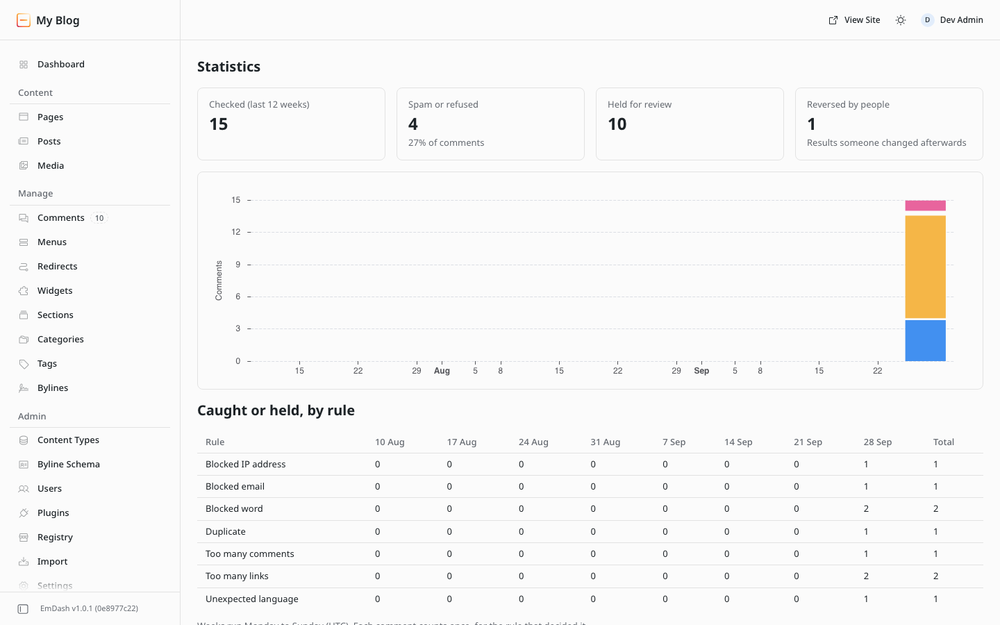
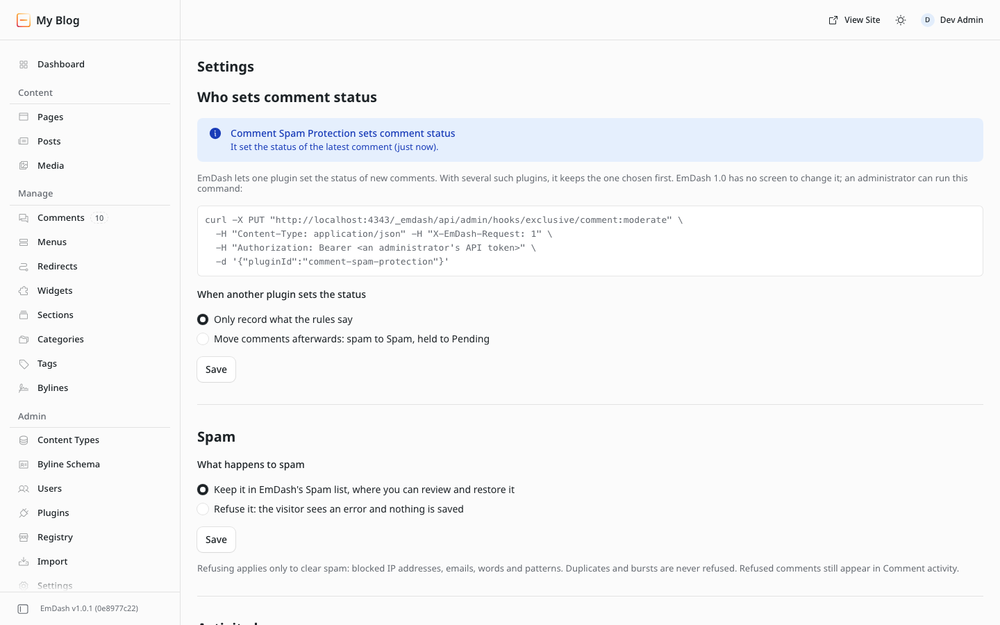
Faq
Does it send comments anywhere?
No. Every check runs on your site, and the plugin makes no network requests. License keys are checked on your site too.
What happens to spam?
By default it is saved with the status Spam, so you can review and restore it in EmDash's Comments screen. In Settings you can refuse clear spam instead: the visitor sees an error and nothing is saved. Refused comments are still listed in Comment activity.
Why was a comment held?
Open Comment activity. Each row shows the rule that decided and why, such as "3 links (limit 2)" or "Blocked word: casino".
Can I block an IP address?
Yes: on Comment activity, open a comment's Actions menu and choose Block this IP address. EmDash never shows plugins the address itself, only a scrambled code for it, so addresses can't be typed in.
Will my regular commenters be held?
Signed-in members are approved unless a blocked email, word or pattern applies. You can also trust people who already have approved comments.
What is a pattern?
A way to catch text a word list can't. For example, \bfree\s+money\b catches "free money" with any number of spaces. Patterns that could slow your site are refused when you save them.
I already use another moderation plugin.
Comment Spam Protection then adds its result and reasons to each comment for that plugin and records them. It can also move spam afterwards.
Does it work with Akismet?
No. Akismet needs the commenter's IP address, which EmDash does not give to plugins.
How much is Pro?
$29 a year for 1 site, $59 for 5 sites, $99 for unlimited sites. Buy at https://peachfinthemes.com/comment-spam-protection/. Pro adds score mode, rules per collection, re-checking old comments, CSV import and export, statistics and a weekly email. https://peachfinthemes.com/comment-spam-protection/
What happens when my license expires?
Pro settings you already saved keep working. To change them, renew.
Security
Reporting a problem
Report security issues privately to hello@peachfinthemes.com. Please do not open a public issue first.
Permissions
- Read users: EmDash runs comment hooks only for plugins with this permission, because comment events include the commenter's email. Also finds administrators' addresses for the Pro weekly email.
- Moderate comments: move comments to spam (Pro re-check, and the optional "move comments afterwards"), and count comments waiting for review. Includes reading comments.
- Send email: the Pro weekly email, through the site's own email provider.
- Read schema: list collections for per-collection rules.
The plugin declares no allowed hosts, so it cannot make network requests.
Access control
The admin pages check the caller's EmDash role on the server. Editors see Comment activity and Statistics and can block from a comment. Only administrators change rules, settings, tools and the license.
Public route
One route is public: export, the Pro CSV download. A followed link cannot carry EmDash's admin request header, so each link is signed with HMAC-SHA-256 using a random key kept in the plugin's configuration. A link expires after 10 minutes. Downloads also need an active Pro license.
Patterns
Patterns are checked when saved, so a pattern cannot stall comment checks.
Data stored
The activity log keeps the commenter's name, email, a short excerpt, a scrambled code for the IP address (never the address), and the result with its reasons, for 90 days by default (30 days to a year). Duplicate and rate counters store only hashes and expire on their own. Weekly statistics are counts. Nothing is sent anywhere except the weekly emails you turn on.
License keys
Keys are issued by the Peachfin Themes store, Ed25519-signed and verified offline. A key contains an order ID, its domains and its expiry date. No personal data is in it.
Changelog
1.0.0
First release.
- Rules: blocked words, blocked patterns, link limit, language check, duplicates, too many comments, blocked and always-approved emails and domains, blocked IP addresses, trusted commenters.
- For each rule, choose spam, hold for review or approve. When nothing matches, your EmDash comment setting decides.
- Comment activity with reasons, filters and one-click blocking; dashboard widget; Try a comment.
- Optionally refuse clear spam instead of saving it.
- Works alongside another moderation plugin: adds its result, records it, and can move spam afterwards.
- Pro: score mode, rules per collection, re-check old comments with a dry run, CSV import and export, statistics, weekly email.
Installation
Requirements
- EmDash 1.0 or later with a plugin sandbox runner. On Cloudflare: the Workers Paid plan and a Worker Loader binding.
- Comments turned on for at least one collection: open it under Content Types and turn on Enable comments.
Install
- Install Comment Spam Protection from the plugin registry.
- Review the permissions and confirm. The plugin asks to:
- read users (EmDash requires this for comment hooks),
- moderate comments,
- send email (the Pro weekly email),
- read the list of collections.
First steps
- Open Comment rules. Sensible defaults are already on.
- Add words, patterns, or emails you want blocked or always approved.
- Open Try a comment and paste a sample comment to see what happens.
- Watch Comment activity. Each new comment shows the rule that decided and why. Use a row's Actions menu to block that IP address, email or domain.
- In Settings, choose whether spam is kept in EmDash's Spam list (default) or refused, and how long the activity log is kept.
Another moderation plugin
EmDash lets one plugin set the status of new comments. If another plugin already does, Comment Spam Protection still checks every comment and records its result. Settings shows which plugin decides and how to change it.
Pro
Buy a key at https://peachfinthemes.com/comment-spam-protection/ ($29 a year for 1 site, $59 for 5, $99 for unlimited) and paste it under Settings → License. The key is checked on your site, without contacting anyone. It works on its domains and their subdomains, and always on localhost and *.test addresses.