
@shane.bsky.shas.am/emdash-crowdsec
CrowdSec
CrowdSec in the EmDash admin: alerts, bans and top threats from your Local API on the dashboard, with optional bans and unbans.
About CrowdSec
CrowdSec in the EmDash admin, read from your CrowdSec Local API with a machine login of its own.
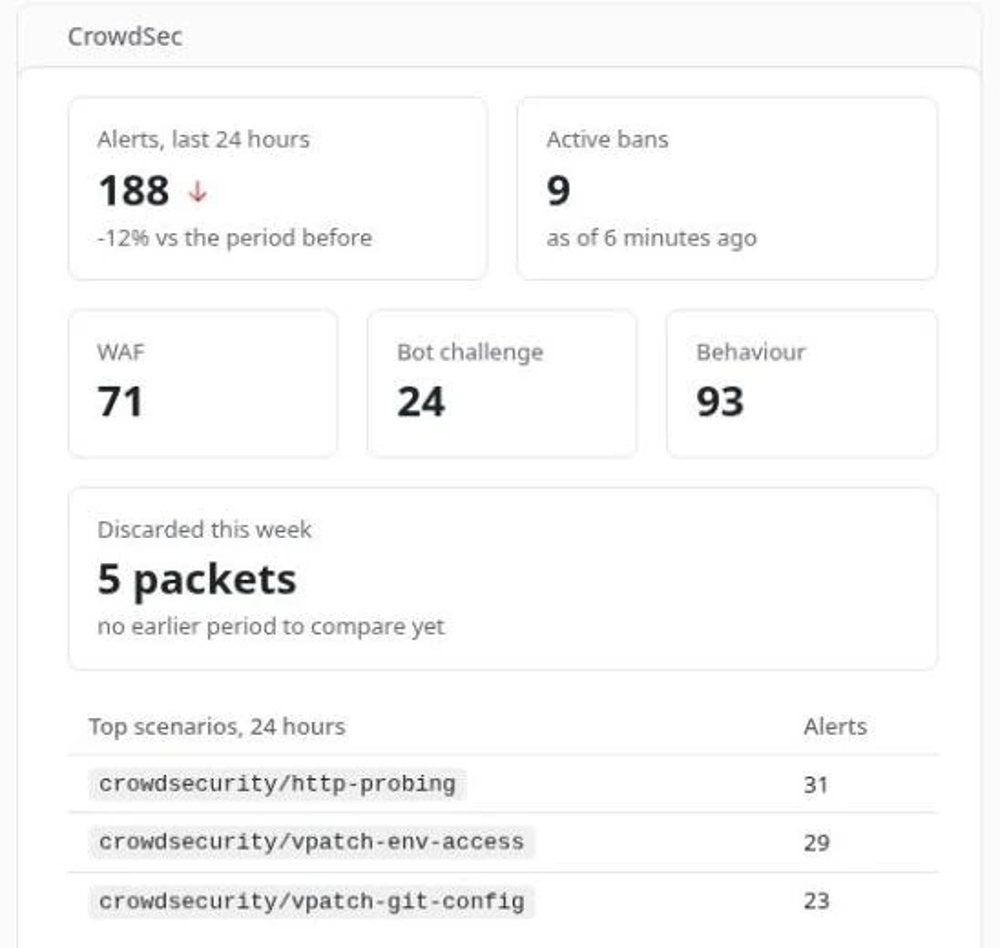
On the dashboard: a CrowdSec card with the last 24 hours' alerts against the 24 before, the bans in force now, alerts by kind (WAF, bot challenge, behaviour) and the top scenarios.
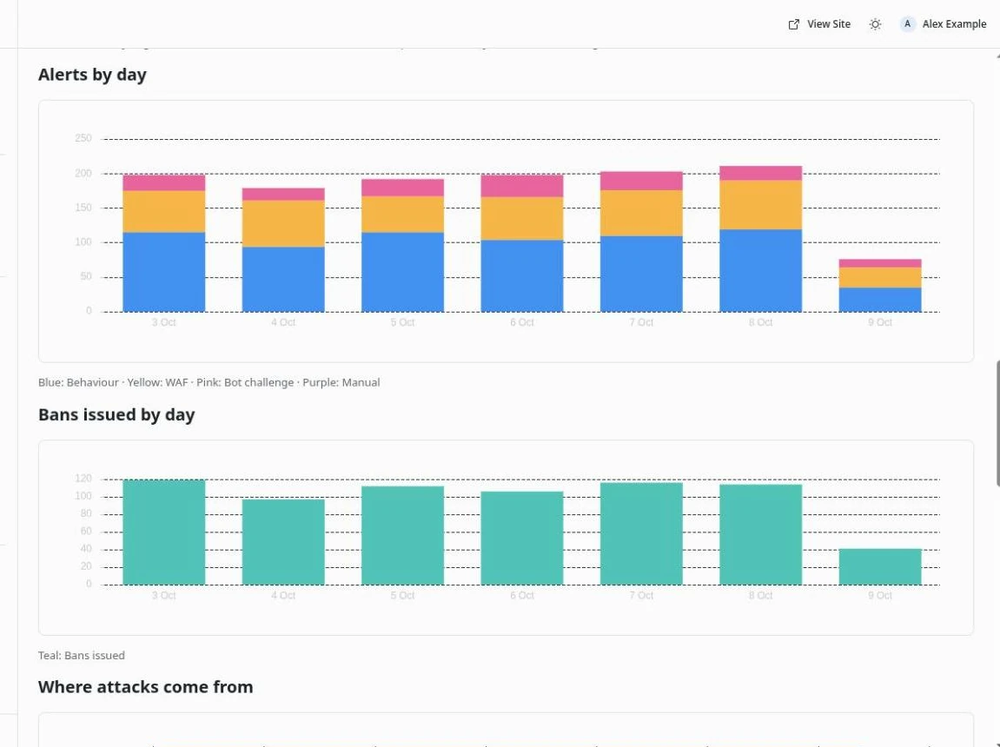
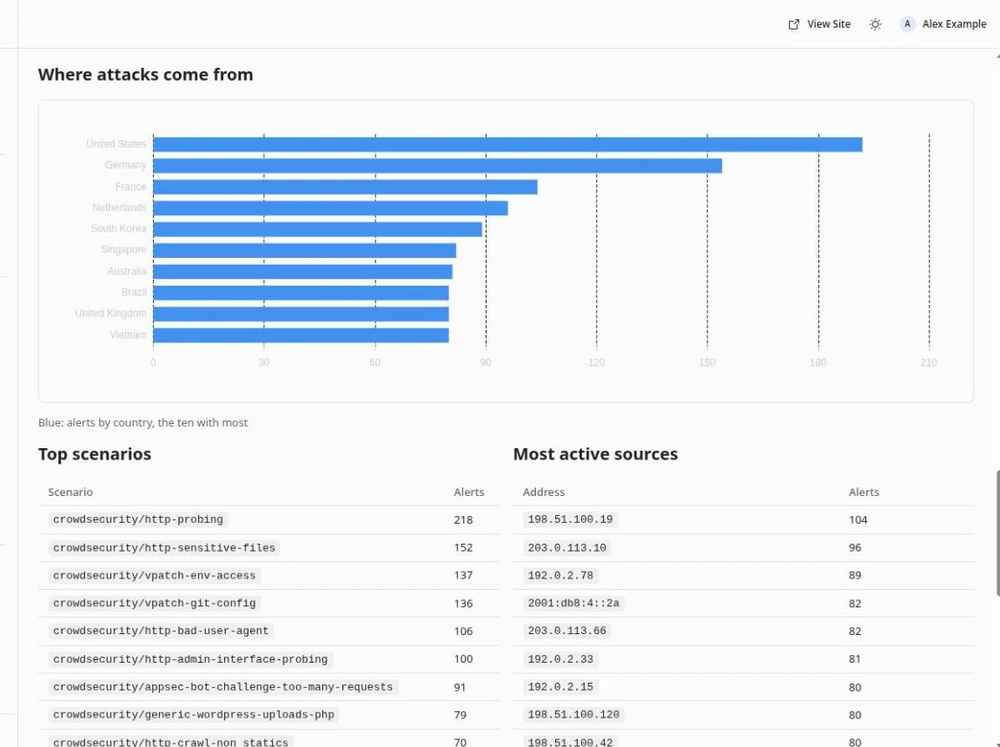
CrowdSec page: 7, 30 or 90 days of alerts by kind and bans issued per day, with the top scenarios, source addresses, countries, AS organisations and targeted paths.
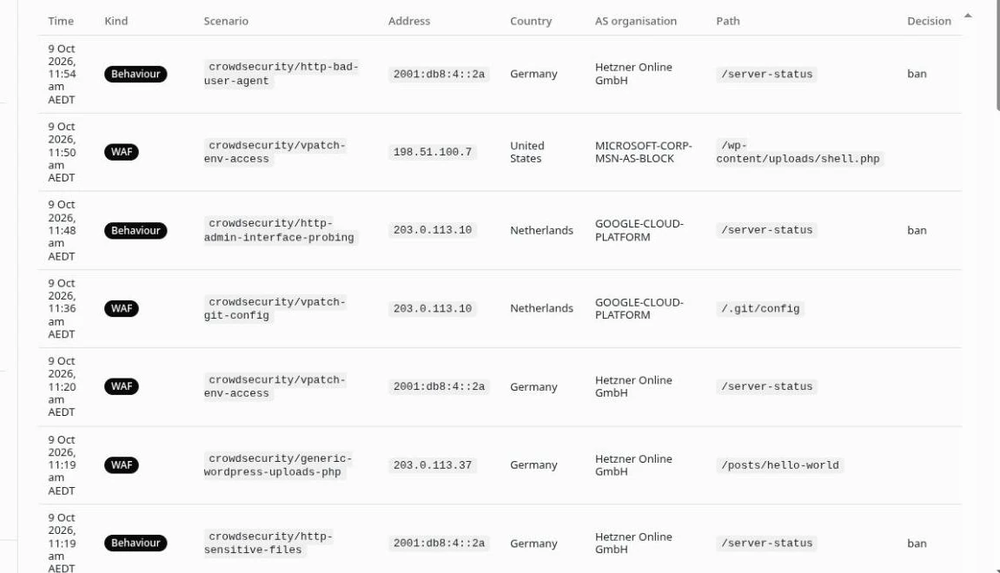
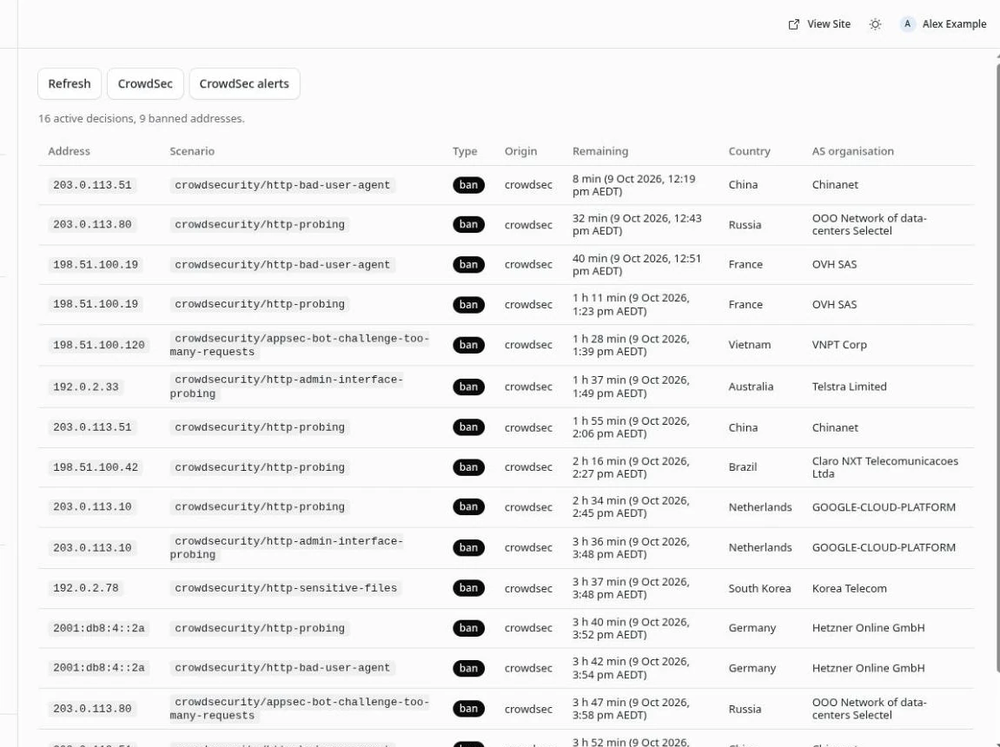
CrowdSec alerts and CrowdSec decisions pages: the stored alerts, filtered by kind and scenario, and the decisions LAPI enforces now, read live and sorted by expiry.
Traffic charts: malicious traffic discarded by the firewall bouncer, split by community blocklist, your detections and manual bans, its share of all traffic, web requests inspected and blocked, the bot challenge, and active bans by source. From your own engine's and bouncer's metrics, never CrowdSec's cloud.
MCP tools: a summary, top threats, active decisions and the alerts for one address, plus three that change things.
Optional changes: with Allow changes on, administrators can ban an address or range for a fixed time, remove a decision and delete old alerts. A ban never covers your own address, the site's, the LAPI host's, your protected addresses, private space or an allowlisted address.
Days run in your time zone. Demo data lets you try it without a LAPI.
Screenshots
Faq
Does the plugin make my CrowdSec LAPI public?
No. EmDash only lets a plugin call public HTTPS hostnames, so LAPI is reached through a path on one, but the proxy in front admits only your EmDash server's address and only the routes the plugin uses. Everyone else gets 403, and every request also needs the plugin's own machine login. LAPI itself still listens on 127.0.0.1. The README shows the setup.
The login fails with "incorrect Username or Password", but the password is right.
LAPI refuses a User-Agent that is not name/version. A proxy that replaces the plugin's causes this.
The setup check says a route was refused (403). Your proxy does not admit it for the EmDash server. Add it as the README shows.
Why are the first days' numbers low? History is read newest first, a window at a time. The page says while it is still being read.
Why is the Decisions list shorter than cscli decisions list?
It lists your own decisions. The community blocklist and lists hold thousands more, shown as one count above the list.
Why is the top list approximate? Each day keeps its 25 most frequent values, so rarer ones are undercounted.
Why can't I delete this alert? Deleting it would delete its decisions where bouncers never hear of it. Remove the decision, then delete the alert two minutes later.
Why was my ban refused? The message names the rule that protects the address. The README lists them all.
Does the plugin store the LAPI token? No. It logs in once per run. The machine password is saved encrypted.
Where do the traffic charts come from? Your engine's and firewall bouncer's own metrics, never CrowdSec's cloud. Set their URLs in the settings.
Which time zone are the days in?
The Time zone setting, Australia/Sydney unless changed. A name the server does not know pauses the sync until it is fixed, and stored history is kept.
Security
Report a security problem privately through the repository's advisory form: https://github.com/shanelord01/emdash-crowdsec/security/advisories/new
What the plugin can reach
Network requests only, to two places: the LAPI URL you enter, and, while Allow changes is on, cloudflare-dns.com to look up the site's and the LAPI host's addresses. It has no access to your content, users or media. It uses only the LAPI routes the README lists, never DELETE /v1/decisions with a filter, never a bulk alert delete, and follows no redirect, so the password is never sent to another host. Plain HTTP and URLs with credentials in them are refused.
Credentials
The machine password is saved encrypted with EMDASH_ENCRYPTION_KEY. The LAPI token is never stored: each run logs in and keeps it in memory. Give the plugin a machine of its own, and publish LAPI so only the EmDash server and only the plugin's routes get through.
Who can do what
Editors and administrators see the card, the pages and the read tools. Only administrators can change anything, and only with Allow changes on. On the pages the plugin checks the role itself. The write tools' routes are limited to administrators by EmDash.
Ban protections
A ban is refused, naming the rule, when it covers the requester's address (for an MCP tool, the client's egress), the site's or LAPI host's addresses, a Protected addresses entry, private, loopback, link-local, CGNAT (including Tailscale's 100.64.0.0/10), multicast or reserved space, a range wider than /16 or /48, or a CrowdSec allowlist entry, checked first since LAPI skips it for manual bans. IPv6 that carries IPv4 is judged by that IPv4 address, and Teredo is refused. A bad protected entry refuses every change.
Deleting alerts
An alert is deleted only once its decisions ended more than two minutes ago, since deleting it removes its decisions where bouncers never hear of it.
Changelog
0.1.0
First release.
- A CrowdSec card on the dashboard, a CrowdSec page over 7, 30 or 90 days, a CrowdSec alerts page and a live CrowdSec decisions page.
- A setup check that names the fix for each thing the numbers depend on.
- Traffic charts from your engine's and firewall bouncer's own metrics, a 24-hour view and a chart of where attacks come from.
- Eight MCP tools:
security_summary,top_threats,active_decisions,ip_alerts,traffic_summary, and, with Allow changes on,ban_ip,remove_bananddelete_alert. - Optional bans, unbans and alert deletion for administrators, with protections for your own address, the site's and the LAPI host's addresses, a Protected addresses setting, private and reserved space, wide ranges and CrowdSec allowlists.
- Days in a Time zone setting,
Australia/Sydneyunless changed. - The community blocklist shown as one daily count of addresses, never as rows.
- Demo data, for trying the plugin without a LAPI.
Installation
You need CrowdSec 1.7 or later with its Local API on a public HTTPS hostname (EmDash refuses private addresses), and EMDASH_ENCRYPTION_KEY set on the site (npx emdash secrets generate makes one).
- On the CrowdSec host, create a machine for the plugin:
sudo cscli machines add emdash-crowdsec --auto -f /root/emdash-crowdsec.yaml. The file holds its ID and password. - Publish LAPI behind a reverse proxy that admits only the EmDash server's address and only these routes:
POST /v1/watchers/login,GET /v1/alerts,GET /v1/alerts/{id}. For changes, alsoPOST /v1/alerts,DELETE /v1/alerts/{id},DELETE /v1/decisions/{id}andPOST /v1/allowlists/check. Never admitDELETE /v1/decisionswithout an id. Exempt the path from any bot challenge. The README has an nginx example. - Install the plugin from the Registry. Its one permission is network access: to your LAPI URL, and to
cloudflare-dns.comwhile changes are on. - In Plugins, open the plugin's settings: enter the LAPI URL (without
/v1), the machine ID and password, and your time zone. Save. - Open Plugins, CrowdSec, and select Check setup. Fix anything it names.
- To allow bans and unbans, turn on Allow changes and add your server and home addresses to Protected addresses.
On Cloudflare Workers, the sync needs the Cron Trigger from EmDash's deployment guide. To use the MCP tools, turn on Agent access for the plugin under Plugins.