
Freeform
Build forms in EmDash with an AI-assisted builder, spam scoring, email notifications, webhooks, and CSV exports.
@solspace.com/freeformOr open Registry in your EmDash admin and search for this name.
Overview
Freeform for EmDash
Build forms, collect submissions, and act on them — without leaving EmDash.
Form builder
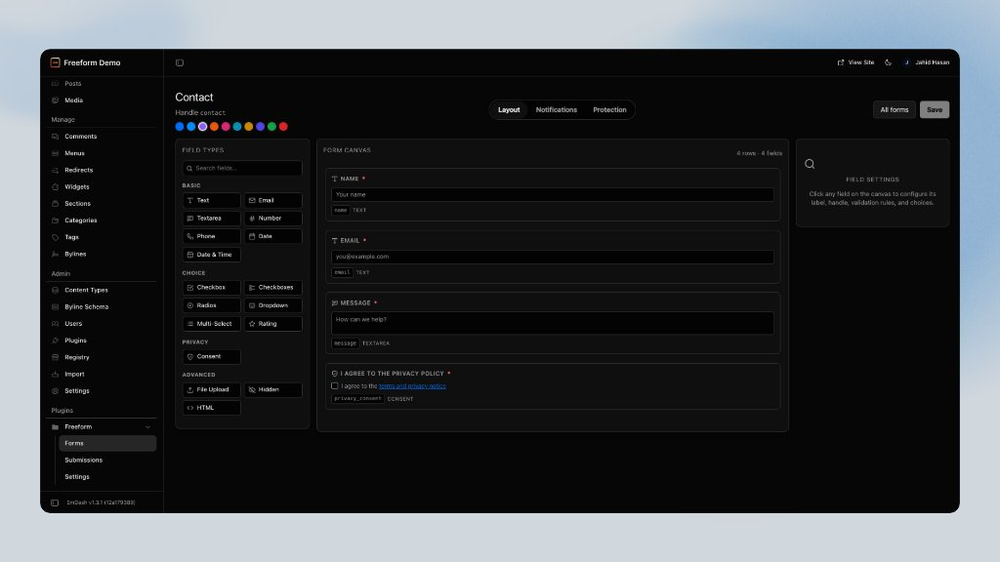
- 13 field types: text, email, textarea, number, phone, date, checkboxes, radio, dropdowns, multi-select, hidden, and HTML blocks
- Row-based layout with per-field validation (length, pattern, min/max)
- An AI builder that creates and edits forms from a plain-English description
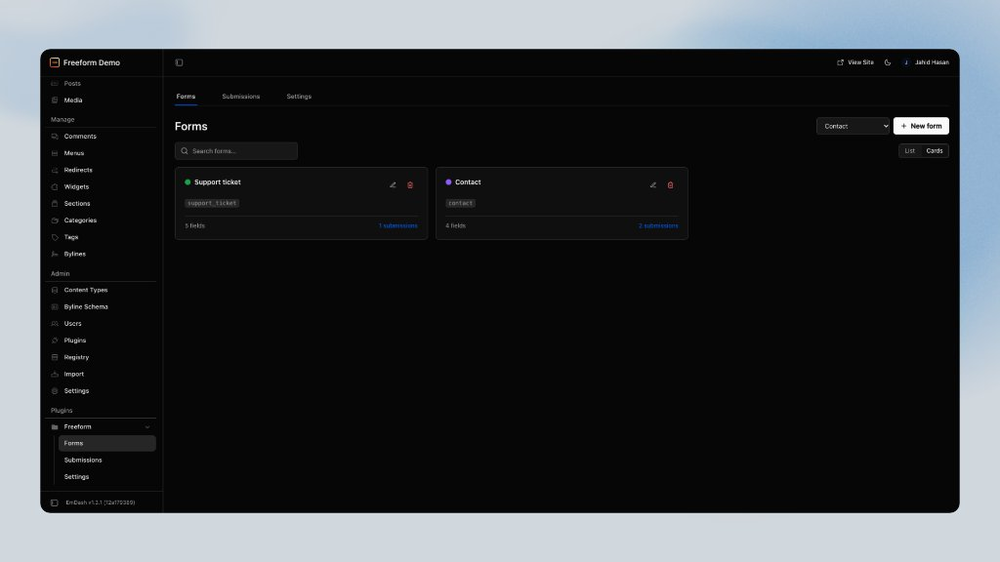
- Starter forms for contact and newsletter signup out of the box
Submissions
- A searchable submissions inbox with pagination and full detail views
- AI submission briefs: intent, urgency, key facts, and a suggested next action
- CSV export for spreadsheets and reporting
Automation & protection
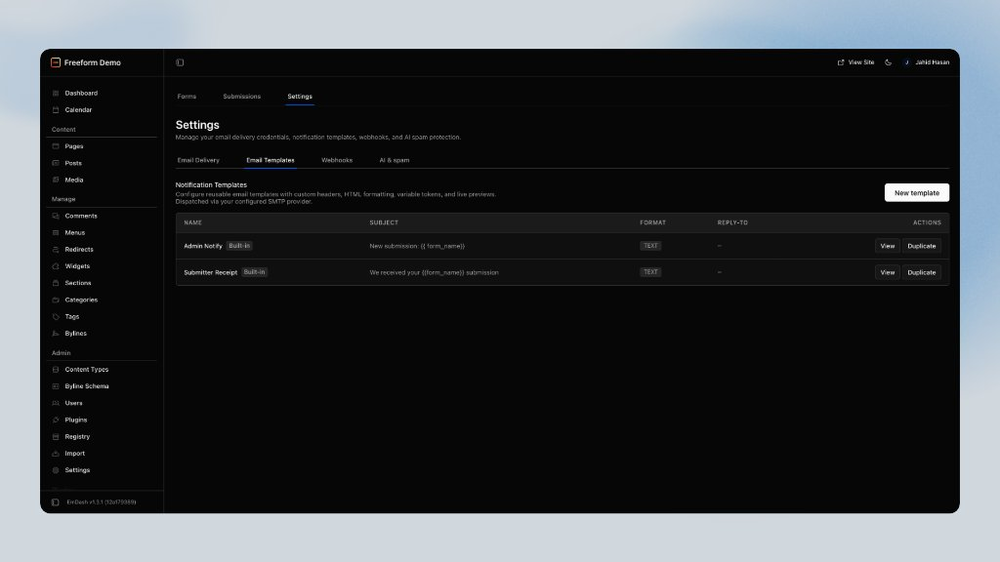
- Email notifications with reusable templates (delivery via EmDash’s email provider — Settings → Email)
- Privacy tooling: consent fields, retention auto-delete, export/delete submissions
- Signed webhooks (HMAC-SHA256) with automatic retries and a delivery log
- Spam scoring with honeypot + CSRF protection on every submission
- Optional MCP server so AI agents can manage forms and read submissions
Forms render on your site with the companion @solspace/freeform-astro
package, which ships unstyled components you theme with your own CSS.
Screenshots
Permissions
Plugins get only the capabilities they declare and you approve. Your EmDash admin lists these again before anything installs.
FAQ
FAQ
Do I need an API key? Only for AI features (Generate with AI, spam scoring, briefs). Add an OpenAI key under Freeform → Settings → AI & spam. Forms, email, and webhooks work without one.
Where do I configure SMTP / Resend / SendGrid? In EmDash → Settings → Email, not Freeform. Freeform decides what to send; EmDash’s email provider delivers it. See Email & notifications.
Why don’t notification emails arrive in production?
Usually no email provider is selected. Open EmDash → Settings → Email, activate
a provider (e.g. emdash-smtp or Cloudflare Email), send a test, then retry.
In local astro dev, EmDash logs mail to the terminal (console provider).
How are submissions protected from spam? Every form has a honeypot and signed CSRF. Optional Cloudflare Turnstile is on the form’s Protection tab. With OpenAI spam scoring enabled, emails are skipped at/above the threshold (the submission is still saved).
Can I get notified about new submissions? Yes. Attach a built-in or custom email template on the form’s Notifications tab (submitter field or custom address), or fire signed HTTPS webhooks.
How do I export or delete someone’s data? Freeform → Submissions → open a row → Export CSV or Delete. See Privacy.
Can AI agents manage my forms?
Yes. The optional MCP server (emdash-freeform-mcp) exposes form and
submission tools to clients like Claude and Cursor.
Are the rendered forms styled?
No — by design. @solspace/freeform-astro renders semantic HTML with
data-freeform-* attributes so forms match your site’s design system.
Security
Security
Reporting a vulnerability
Email support@solspace.com. Please do not open a public issue for security problems.
How Freeform protects your site
- Submission forms carry a honeypot field and HMAC-signed CSRF tokens (timing-safe verification, 2-hour expiry).
- Outbound webhooks are signed with HMAC-SHA256 (
X-Freeform-Signature) so receivers can verify authenticity. - API keys you provide (e.g. OpenAI) are stored in your site's own plugin storage — they are never sent to Solspace.
- Outbound notification email uses EmDash’s
email:sendpipeline and whatever provider the site operator configured under Settings → Email (Freeform does not store SMTP passwords). - Export links are short-lived, signed tokens; they expire automatically.
Installation
Installation
1. Install the plugin
Make sure the registry is enabled in your astro.config.mjs
(emdash({ registry: "https://registry.emdashcms.com", … }), EmDash ≥ 1.0),
then in the EmDash admin go to Plugins → Registry, find Freeform, and
install it. Freeform appears in the sidebar once installed.
2. Render forms on your site
Freeform's admin lives in the plugin; the public forms are rendered by a small companion Astro package:
pnpm add @solspace/freeform-astro
// astro.config.mjs
import freeformAstro from "@solspace/freeform-astro";

export default defineConfig({
  integrations: [emdash(), freeformAstro()],
});
Then embed any form by its handle:
---
import { FreeformForm } from "@solspace/freeform-astro/components";
---

<FreeformForm formId="contact" />
3. Email delivery (required for real notification mail)
Freeform does not configure SMTP/IMAP. Configure EmDash first:
- Install an email provider plugin (e.g.
emdash-smtpor Cloudflare Email) - EmDash admin → Settings → Email → select provider → Send test email
- Then attach Freeform notification templates to your forms
Full details: Email & notifications.
In local astro dev, EmDash uses a console provider (logs to the terminal) so
you can test Freeform notifications without SMTP.
4. Optional: AI features
Generate with AI, spam scoring, and submission briefs need your own OpenAI API key under Freeform → Settings → AI & spam. Without a key, everything else — building forms by hand, submissions, email (via EmDash), webhooks — works normally. The Generate with AI button only appears once a key is saved.
Keep exploring
More plugins like Freeform
Browse by keyword, or see everything @solspace.com publishes.